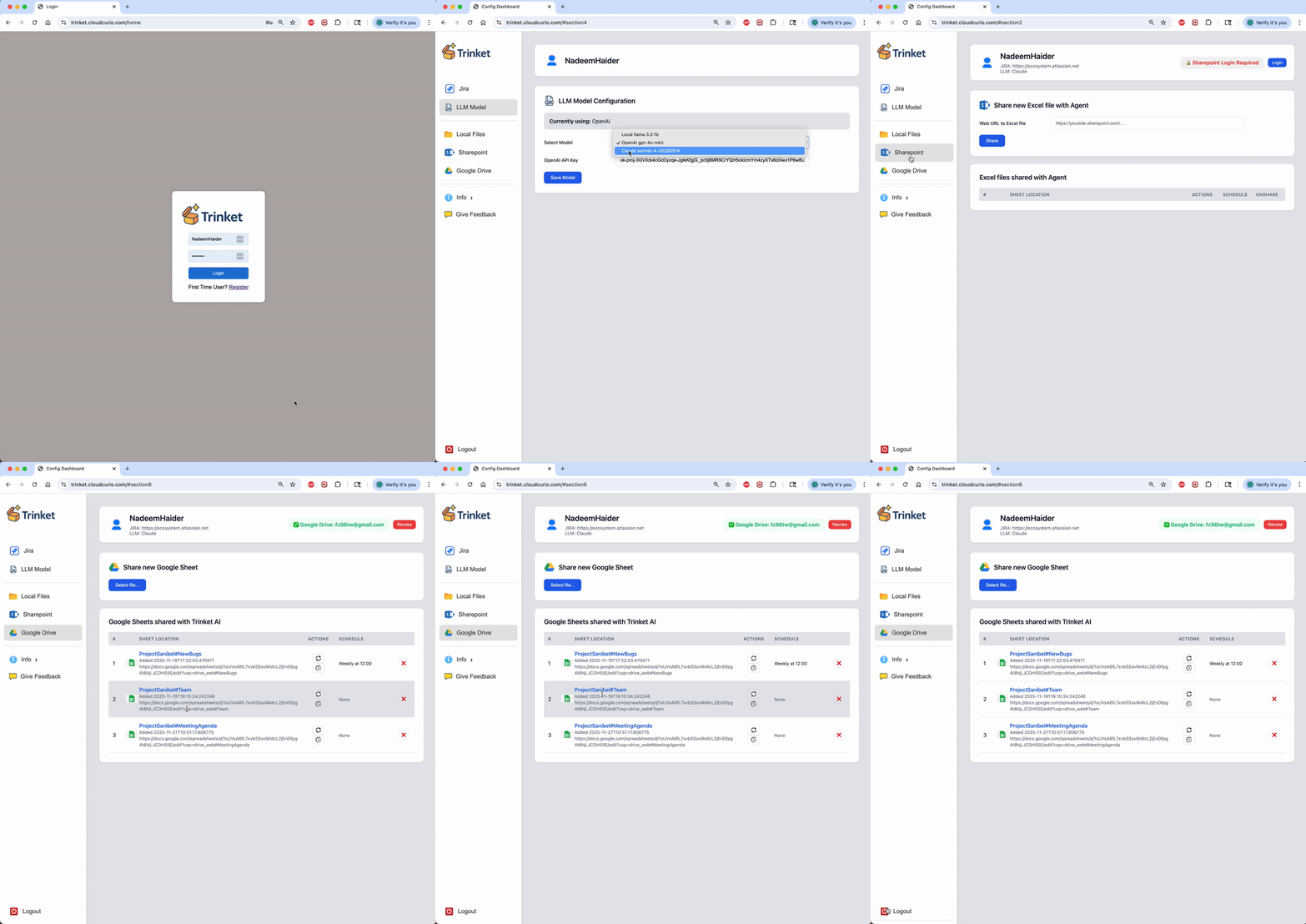
Curio AI transforms Jira project data into actionable insights. It tracks workflows and velocity, automates status reporting, and maintains living project documents in Confluence, Google Docs, and Microsoft Sharepoint. Detect alignment drift, surface delivery risk, and eliminate operational toil so teams can focus on delivering customervalue.
Curio AI is a cloud service that turns Jira chaos into clarity. Transform your Jira project data into fast, actionable insights - embedded within the shared documents your teams already use to collaborate.
Curio AI enables Product Owners, Project Managers, Engineering Leaders, Scrum Masters, and PMOs to apply Generative AI and LLM analysis to evaluate projects, validate alignment to goals and standards, strengthen risk mitigation, and extract actionable insights. Reduce manual reporting toil, improve team productivity, and accelerate delivery of customer value.
Curio automatically generates project status reports by ingesting live Jira data and rendering it into existing documents across Confluence, Google Docs, Sharepoint, and local files. The platform applies AI-driven analysis to derive progress summaries, trend indicators, risk signals, and dependency mappings from underlying issue data. Project managers and stakeholders can access up-to-date status on demand rather than being blocked waiting for team stand-ups.
Jira information is often scattered across comments, attachments, and issue history, making it difficult to analyze and report on systematically. Curio ingests Jira artifacts and applies LLM-based summarization, risk analysis, and recommendation generation to produce structured, actionable outputs. Layered prompt pipelines can be used to extract specific signals from unstructured Jira content.
Curio lets you define custom project templates that organize and present Jira data in meaningful ways. These templates use LLMs to analyze and summarize work, surface risks, and highlight dependencies. By combining Jira data with your own annotations and context, Deliver tailored insights that help teams make better decisions.
Stop maintaining static spreadsheets and wikis for project status tracking, or forcing engineering teams to update multiple documents for different stakeholders. Curio AI automates the generation of stakeholder-specific project views by integrating Jira data into shared documents. Curio’s layered approach to persistent LLM prompts and context make it easy to create reports tailored to any audience.
Teams lack actionable insights into velocity and workflow bottlenecks. Curio analyzes every workflow transition in your Jira projects and automatically report cycle time, developer velocity, identify process bottlenecks, and provide recommendations to optimize team productivity and accelerate delivery.
Curio is document-centric and opens up Jira data to external LLMs and AI services to provide richer, more customizable analyses. Curio’s AI-powered project curation capabilities include:
These are some examples of what is possible, in reality the blending and extending of Jira data with LLMs is virtually limitless.
Identify newly created bugs in your Jira project over the last week and analyze their descriptions using LLMs to determine if they provide reasonable details for Engineering action.
Look at the Engineering team's monthly Jira resolution rate and summarize the impact of their work over last 3 months.
Understand the team's cycle time and apply AI to analyze the Jira data to identify friction-points impacting team velocity.
Selectively blend Jira information and project outlines into customized narrative intended for specific project stakeholders.
Turn your curated reports into a weekly status report. Schedule report creation and periodically email to stakeholders.
Curio can be used as a cloud service or self-hosted for fully on-premises deployment. Please send a request to info@cloudcurio.com and we can setup a meeting to discuss your exact needs.
No. Curio requires read-only access to Jira with a minimally-scoped access token. Any team member may use Curio using the single read-only account that sets up the access token. Many teams take this opportunity to consolidate all their read-only Jira licenses into a single read-only account to reduce Atlassian licensing cost.
Atlassian Intelligence is single vendor, black-box LLM with limited flexibility and extensibility. Jira AI is "Ask Question - Get an Answer" UI-centric experience (NOT document-centric)
with ad hoc user interactions, fleeting context, and throw-away prompts.
All data remains locked inside the Atlassian ecosystem, with limited integration with popular collaboration platforms.
Atlassian Intelligence requires additional premium licenses for each user.
No. Curio AI only maintains the abiity to access the documents you share with it. All the information it generates is stored in your existing documents that are used for team collaboration in Google Drive or Microsoft Sharepoint. Curio is an AI agent that keeps shared documents updated with Jira information. You don't need to log into Curio to access your data.
All Curio network traffic is encrypted. All interaction with Jira, Google Drive, Microsoft Sharepoint is done securely with OAuth2 and least-privileged authorizations policy enforced on per document basis. All the data the Curio pulls from your Jira instance is blended into your documents in Google Drive and Microsoft Sharepoint. Curio does not save any data outside of your collaboration documents.
Yes. Self-hosting the entire Curio stack is supported. Please email info@cloudcurio.com for more information or message me over linkedin on the on-prem setup.
Please contact us or email info@cloudcurio.com to inquire about customizations, integrations, and other bespoke capabilities.

Consolidate all read-only Jira accounts into single account

Publish Curio reports to Confluence Wiki

Share and collaborate over Google Drive
.webp)
Create and collaborate over Microsoft Sharepoint

Bring your own key and use your OpenAI GPT account for analysis of your Jira project data
.webp)
Bring your own key and use your Anthropic Claude account for analysis of your Jira project data
Run open source models in your local environment to keep everything on-premises

Curio MCP Server to connect all the reports to external GPTs and Agents